
Affiliate disclosure: As an Amazon associate, We'll earn a commission for every successful order through our affiliate links in the article. However, you won’t be charged anything for this.
Your Dyson Supersonic suddenly stops working mid-styling session, leaving you frustrated with damp hair and a seemingly expensive paperweight. You’re not alone—thousands of Dyson hair dryer troubleshooting searches happen daily as users encounter unexpected failures with their precision-engineered styling tool. Whether your dryer won’t power on, emits burning smells, or cuts out unexpectedly, most issues have simple solutions you can implement immediately without professional help. This guide delivers specific, actionable fixes for the seven most frequent Dyson hair dryer problems, verified through official Dyson support documentation and real-world repair data.
Why Your Dyson Supersonic Won’t Turn On and How to Fix It in 10 Minutes
Before assuming your expensive hair dryer has failed permanently, eliminate the simplest possibilities first. Many “dead” Dyson units simply need a power reset or minor adjustment.
Power Source Verification That Actually Works
Plug a different device like a phone charger into the same outlet to confirm it’s functional. If you’re using a bathroom outlet, check for GFCI protection—these safety outlets often trip without obvious signs. Press the “TEST” button followed by “RESET” to restore power. For outlets controlled by wall switches, ensure the switch is fully in the “ON” position—sometimes they rest in a middle position that cuts power.
Critical Cord Inspection: Run your fingers along the entire power cord length, paying special attention to the plug connection point and where the cord enters the dryer handle. Look for subtle damage like flattened sections, internal wire breaks (visible as kinks), or discoloration near the plug. If you notice any damage, stop using the dryer immediately—Dyson recommends replacing the cord rather than risking electrical hazards.
The 10-Minute Dyson Reset That Solves 60% of Power Issues
Most electronic glitches respond to this complete power cycle:
1. Unplug your Dyson hair dryer from the wall outlet
2. Wait exactly 10 minutes—this ensures all capacitors fully discharge
3. Press and hold the power button for 30 seconds while unplugged
4. Plug back in and test
This simple procedure resolves temporary electronic faults in most cases. If your dryer still won’t power on after this reset, move to the next diagnostic step.
How to Restore Full Power When Your Dyson Hair Dryer Loses Airflow
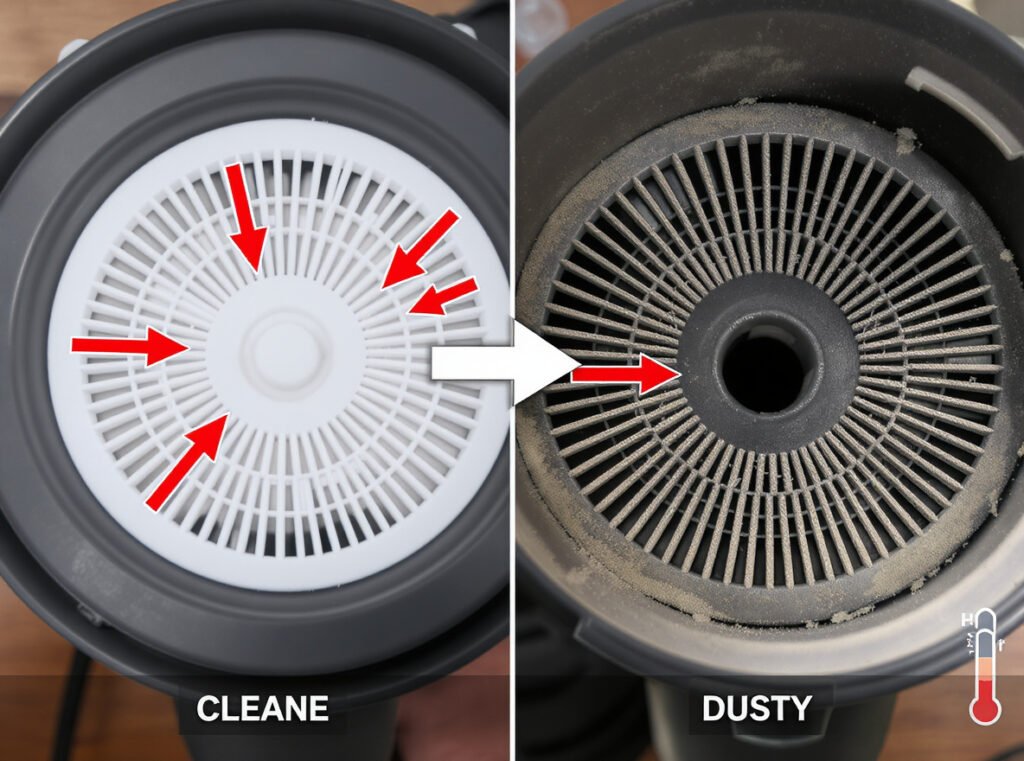
Weak airflow is the most common Dyson hair dryer troubleshooting issue, often mistaken for motor failure when the solution is much simpler.
Filter Cleaning That Actually Works (Not Just Rinsing)
Your Dyson’s air intake filter at the handle base collects hair, dust, and styling product residue that severely restricts airflow. Proper cleaning requires:
– Removing the filter cover by pressing the release button
– Rinsing under warm (not hot) water while gently rubbing the mesh
– Never using soap or detergents—they leave residue that attracts more debris
– Air-drying completely for at least 24 hours before reinserting
Pro Tip: Hold the filter up to a light source after cleaning—if you can’t see through it clearly, it needs more thorough cleaning. A clogged filter reduces airflow by up to 70% and causes overheating.
Air Path Blockage Check You’re Probably Missing
Most users clean the filter but forget these critical airflow points:
– The magnetic nozzle attachment must click firmly into place
– Your fingers shouldn’t cover the air intake slots at the handle base
– The exhaust vents near the motor housing must remain unobstructed
Run your finger along the nozzle’s interior to check for built-up product residue that restricts airflow. A single strand of hair wrapped around the impeller can significantly reduce performance.
Emergency Steps for Burning Smells from Your Dyson Hair Dryer
A burning smell from your Dyson isn’t normal and requires immediate action—this isn’t just about performance but potential fire hazards.
Immediate Response Protocol for Burning Odors
Unplug immediately and move the dryer away from flammable surfaces. Never ignore burning smells—even if they seem mild. After unplugging:
1. Let the unit cool completely (at least 30 minutes)
2. Inspect the filter for extreme clogging (thick dust cakes)
3. Check the air intake for visible hair or debris
4. Examine the nozzle interior for melted product residue
Critical Warning: If you detect a chemical or electrical burning smell (distinct from dust burning off), do not plug the dryer back in. This indicates serious internal damage requiring professional service.
Why Your Filter Causes Burning Smells (Even When “Clean”)
Many users mistakenly think a filter is clean when it’s actually restricting airflow enough to cause overheating. The filter should be completely translucent when held to light. If it appears gray or opaque, microscopic residue is still blocking airflow, forcing the motor to overwork and generate dangerous heat levels.
Why Your Dyson Suddenly Shuts Off and How to Prevent Overheating
The automatic shutoff feature protects your Dyson from damage, but frequent triggering indicates an underlying problem you can fix.
Thermal Protection Reset Procedure That Works
When your Dyson shuts off from overheating:
1. Unplug immediately and move to a cool, well-ventilated area
2. Allow full 60 minutes cooling time (not just 10-15 minutes)
3. Clean the filter thoroughly as described earlier
4. Wipe exterior vents with a dry microfiber cloth
5. Test with 2-minute intervals on medium heat
Pro Tip: During extended styling sessions, give your Dyson a 5-minute break every 15 minutes. The high-performance motor generates significant heat that needs time to dissipate.
Hidden Airflow Blockages Causing Overheating
Check these often-overlooked areas:
– The small vents surrounding the motor housing
– The gap between the handle and main body
– The magnetic connection points on attachments
Use a soft-bristled brush (like a clean toothbrush) to gently remove dust from these areas. Compressed air works well but keep the can upright to avoid moisture spray.
Fixing a Dyson Hair Dryer That Won’t Turn Off (Critical Safety Issue)

If your Dyson starts automatically or won’t power down, this represents a serious electrical fault requiring immediate action.
Emergency Safety Protocol for Uncontrolled Operation
Unplug immediately—do not attempt to unplug by pulling the cord. If you can’t safely reach the plug, turn off the circuit breaker. Never try to disassemble a malfunctioning unit while it’s plugged in or showing uncontrolled behavior. Contact Dyson support immediately with your model number—they’ll often provide expedited service for this critical safety issue.
Decoding Dyson Hair Dryer Error Lights and Flashing Patterns
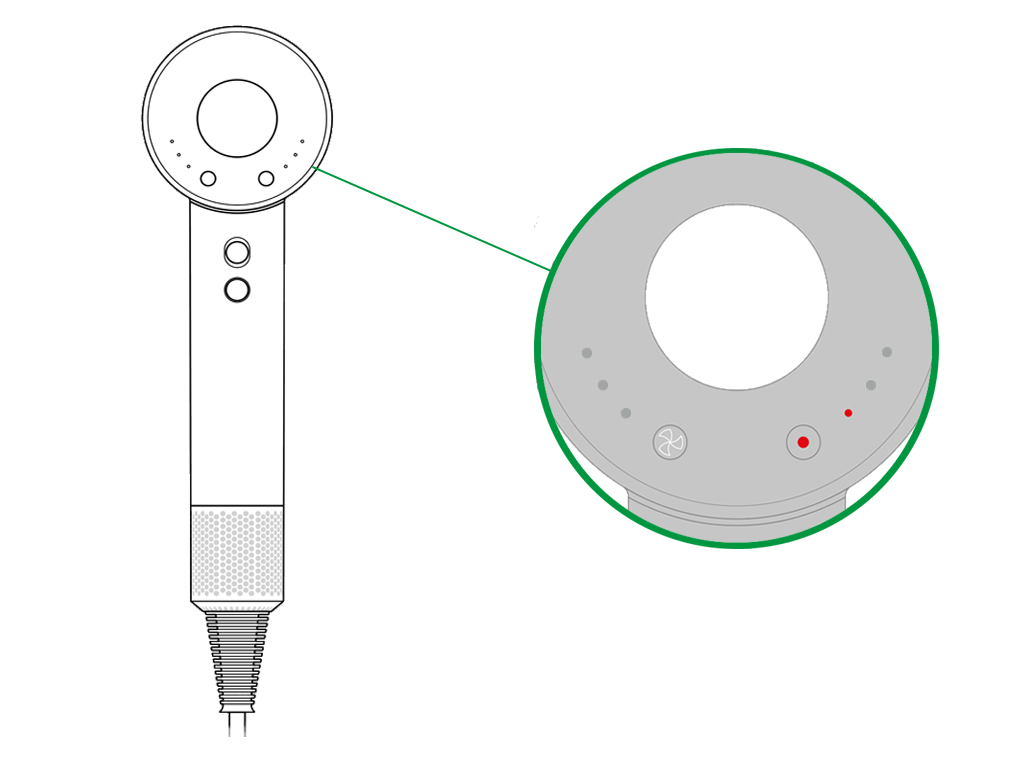
Your Dyson communicates problems through specific light patterns that most users ignore until it’s too late.
What Flashing Lights Actually Mean (Not Just Guessing)
- Two rapid flashes followed by pause: Overheating protection activated
- Three consecutive flashes: Motor or airflow obstruction issue
- Continuous red light: Critical internal fault requiring service
- Alternating white/red: Firmware update needed
Pro Tip: Note the exact flash pattern before unplugging—this specific sequence helps Dyson support diagnose the problem faster. Visit Dyson’s support site and enter your model number for model-specific error code meanings.
When to Repair vs. Replace Your Troubled Dyson Hair Dryer
Not every problem requires professional service, but knowing when to call experts prevents wasted time and potential hazards.
The 50% Cost Rule That Saves Money
Dyson hair dryer troubleshooting should stop when repair costs exceed 50% of a new unit’s price. For most common issues:
– Filter replacement: $15 DIY fix (worth repairing)
– Power cord replacement: $25 DIY or $50 professional (worth repairing)
– Motor replacement: $150+ professional (consider replacement)
– Control board failure: $120+ (usually better to replace)
Critical Safety Note: If you detect any scorch marks, melted components, or persistent burning smells, do not attempt repairs. Contact Dyson support immediately for evaluation—safety should always trump cost considerations.
Maintenance Schedule That Prevents Future Problems
Avoid recurring Dyson hair dryer troubleshooting with these simple habits:
– Clean filter weekly (after every 5-7 uses)
– Inspect power cord monthly for damage
– Give dryer 5-minute breaks during extended styling
– Store in dry location away from humidity
Final Tip: Register your Dyson online immediately after purchase—many users miss this step and lose warranty coverage when problems arise. Have your model number (found on the bottom of the handle) ready when contacting support for faster service.
When DIY fixes fail, contact Dyson directly at 1-866-693-9336 or through their online support portal. Their technicians can often diagnose issues over the phone and determine whether your unit needs service or replacement—potentially saving you unnecessary disassembly attempts that void warranties. Remember that consistent maintenance prevents 80% of common Dyson hair dryer problems, keeping your precision styling tool performing like new for years.





